Aim Assist
The Aim Assist module assists your aim in combat
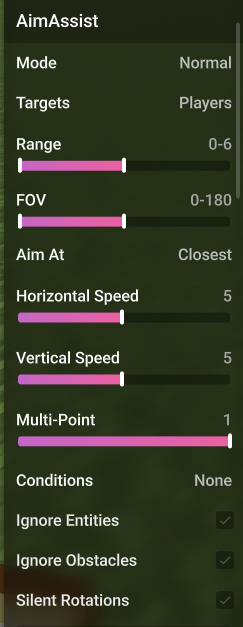
Options
Settings to customize the behavior of the Aim Assist.
Mode
The method used to rotate the player.
- Normal: Uses basic linear interpolation (Lerp) for smoother aiming.
- Linear: Aims at the target using a constant linear speed.
- Lock-on: Instantly snaps rotations to the target without any smoothing.
- Test: A testing mode for development.
Targets
Selects which type of entities the module should target (Players, Hostile, or Passive).
Range
The maximum distance (in blocks) the entity can be for the module to target them.
FOV
The Field of View (in degrees) within which the module will search for targets.
Aim At
Determines which part of the enemy hitbox to target.
- Closest: Aims at the point on the hitbox closest to your crosshair.
- Direct: Aims directly at the center of the target's hitbox.
- Random: Aims at a random point on the hitbox.
- Noise: Uses realistic noise to generate random points on the hitbox.
Horizontal Speed
How fast the aim assist rotates your camera horizontally.
This setting is hidden when Mode is set to Lock-on.
Vertical Speed
How fast the aim assist rotates your camera vertically.
This setting is hidden when Mode is set to Lock-on.
Multi-Point
Determines how much of the entity's hitbox is taken into consideration (percentage) when calculating visibility and aim.
Conditions
Specific conditions that must be met for the Aim Assist to activate.
- On Click: Only activates while the attack button is held.
- Weapon Only: Only activates while holding a weapon (Sword/Axe).
- BotCheck: Only activates if the target passes the bot check.
Ignore Entities
Ignores entities that are in the way and rotates through them anyways.
Ignore Obstacles
Ignores blocks/walls that are in the way and rotates through them anyways.
Silent Rotations
Rotates to the enemy server-side without changing your client-side view.
Use MovementFix (silent or custom) alongside this module to bypass anticheats that check if your movement direction is illegitimate.
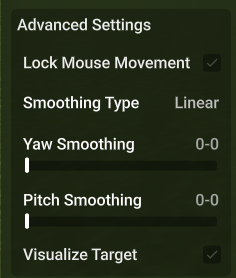
Advanced Settings
Lock Mouse Movement
Prevents you from manually moving your mouse while Aim Assist is active.
Smoothing Type
How smoothly your rotations are, and how smooth it is while rotating back.
Yaw Smoothing
Adjusts the smoothing for horizontal (Yaw) movement.
Pitch Smoothing
Adjusts the smoothing for vertical (Pitch) movement.